

MyLuck Casino App

Canada’s new favourite casino is in your pocket

Download the MyLuck app and claim up to C$2,100 + 300 free spins on your first deposit.

MyLuck mobile

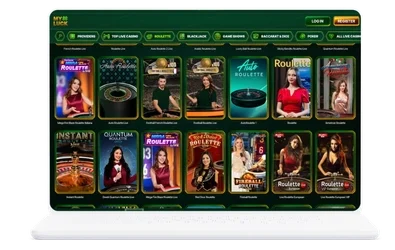
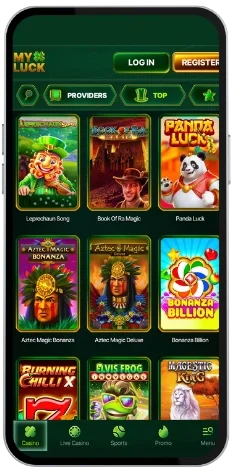
We designed the MyLuck Casino app for players who like gaming without being stuck to a desk. Whether you’re relaxing on the sofa, taking a break at work, or waiting around, the My Luck app lets you play everything we offer. 4,000+ games, live casino games, sports bets, and real cash bonuses, all in a 34MB app that installs within minutes.

New users get a welcome package worth up to C$2,100 + 300 free spins. That’s not a tease with wagering requirements hidden in the small print. It’s an honest-to-goodness welcome package to see you playing your best right away. The MyLuck casino app download time is less than it takes to make a decent coffee, and you’ll be gaming before you finish it.
MyLuck app

Features That Make This App a Must-Have for Canadian Players

We’re not going to oversell this. Here’s what you actually get when you use the My Luck mobile app in Canada:

  • Over 4,000 games including slot games, table games, live casino, and crash games
  • Live Casino titles powered by Evolution Gaming and Pragmatic Play
  • Built-in sports betting and eSports options
  • Daily, weekly, and weekend reload bonuses with free spins
  • VIP casino rewards and a dedicated VIP Manager
  • 24/7 Priority Support via live chat or email
  • Progressive jackpot slots with huge payout potential

The user experience is tidy. No useless clutter, no waiting around, no confusing menus. We’ve teamed up with 44+ game providers including Evolution Gaming, Pragmatic Play, Playtech, and BGaming to ensure our game selection covers every classic casino game you can think of, from blackjack to live baccarat and live roulette. And if you happen to hit a technical error, just reload the page and you’ll be back in a few seconds.

We take all the necessary precautions when it comes to your security. We hold a licence from the Curaçao Gaming Control Board (OGL/2024/129/0131), and we’re operated by 130 Group N.V. Your money, your data, and all other sensitive details are totally safe. As a casino committed to responsible gambling, we’ve built tools into your account to help you stay in control.

MyLuck casino app

MyLuck Casino APK for Android

The process of downloading the MyLuck casino APK for Android is straightforward. We don’t list it on the Google Play Store, so you need to get the APK directly through us. Follow these steps:

  1. Open your Android browser and go to the MyLuck Casino website
  2. Locate the app download free link and tap it to get the APK file
  3. Head to your device settings and activate “Install apps from unknown sources” in security
  4. Tap the APK file to install it on your device
  5. Open the app, sign in or create a new account, and start playing

The file size is 34MB, so your phone won’t notice it taking up disk space. It takes less than two minutes to get this app installed on any Android device. It’s compatible with all modern Android handsets and tablets. If you have any trouble installing it, simply ping our customer support team via 24/7 live chat and we’ll assist you right away.

MyLuck casino apk

MyLuck Casino App for Your iOS Device

If you want the MyLuck app for your iPhone or iPad, here’s all you need to do:

  1. Open the App Store on your iPhone or iPad
  2. Search for “MyLuck Casino”
  3. Tap “Get” and verify with Apple Touch ID, Face ID, or your login details
  4. Launch the app and sign in or create your profile

This application is designed for the modern iPhone and iPad. The download is quick, the layout adjusts to fit your screen perfectly, and you get the full game library just as if you were playing from a PC or Mac. Live Dealer Games, sports bets, and all of your payment options work identically on iOS as they do on your laptop. If you’re in a restricted region for legal reasons, the app will let you know at login.

MyLuck Casino Application for Windows and Mac OS

The good news for desktop players in Canada is that you don’t have to download anything. Simply go to the MyLuck Casino website from a PC or Mac and start playing. The site is fully compatible with Windows and macOS and works well on all major browsers including Chrome, Safari, and Opera. The mobile browser version is also available if you prefer. It loads quickly and lets you log into the same account you use on desktop. If you’d rather have a native application for your desktop experience, simply click to download our desktop app and enjoy a more tailored user experience.

FAQ

Is the MyLuck App Safe to Download?

Absolutely. Our licence from the Curaçao Gaming Control Board (OGL/2024/129/0131), issued to 130 Group N.V., ensures we follow fair and ethical practices at all times. The app uses encrypted data connections to keep your information secure. If you ever spot anything unusual on your account, contact us immediately so we can sort it out fast. Keep your device updated with the latest system patches, and you’ll be in good hands with us.

Do I Need to Download the App or Can I Play in a Mobile Browser?

You can do both. The mobile browser version of the My Luck site works on all Android and iOS phones and tablets. That said, we generally recommend the native app because it runs smoother and loads faster. The MyLuck app download is only 34MB, so it won’t clog up your phone’s storage. If you want to try things out first, the mobile browser version works just fine. Either way, you’re getting the full casino experience.

What Payment Methods Are Available in the App?

We support a wide range of payment methods including Visa, MasterCard, Skrill, Neteller, Google Pay, Bitcoin, Litecoin, and many more. We’re happy to process transactions in CAD. Cashout limits are C$950 per day, C$3,050 per week, and C$12,200 per month. Every payment option available on the desktop site works in the app too, so there’s no difference in how you manage your funds.

Can I Claim Casino Bonuses Through the Mobile App?

Absolutely. All of our casino bonuses are accessible directly through the app. The welcome package, reload bonuses, free spins, and any active promotions all show up in your account just as they do on desktop. Just make sure you check the rollover requirements before withdrawing, so you know exactly where you stand. We keep things transparent so there are no surprises when you go to cash out.

How Much Space Does the App Take on My Device?

The MyLuck app is just 34MB, so it’ll barely make a dent on your device’s storage. We kept it compact on purpose without cutting corners on features. You get the full game library, live chat, cashback rewards, and account management all in one lightweight package. If you ever need to reinstall, your account data and settings are saved online, so you won’t lose a thing.

Who Are the Game Providers Behind the App?

We work with 44+ software providers to bring you a seriously stacked game library. You’ll find titles from Pragmatic Play, BGaming, Octoplay, Playtech, and Evolution Gaming, among many others. That’s why you can jump between baccarat, poker, blackjack, and live shows all in one place. Every one of our game providers is audited for fairness, so you can trust that what you see is what you get.